
Resolving Conflicts
Resolve conflicts
A merge, rebase, cherry-pick, or pull can stop when Git cannot combine changes automatically.
Gitfox keeps the operation active and lists each conflicted file on the Unstaged side of the worktree outline.
Select a conflicted file to open its editable conflict diff. Resolve every conflicted file before continuing the operation.
Resolve the whole file
Use the toolbar buttons when one side should win for the whole conflicted file:
Use Ourskeeps Git’soursversion.Use Theirskeeps Git’stheirsversion.
Gitfox replaces the whole file with the selected version and stages it to mark the conflict as resolved.
For merges, pulls, and cherry-picks, ours is normally the checked-out history and theirs is the change being applied. During a rebase, Git checks out the new base and replays your commits onto it, so these sides are reversed relative to the branches you started with. Review the diff before choosing a whole-file version.
Resolve individual conflict hunks
If you want to keep different sides for different conflict hunks, resolve them inside the diff instead.
Find a highlighted conflict block and use either of these controls:
- Click the gutter button next to the conflict hunk, then choose
Choose OursorChoose Theirs. - Right-click the conflict hunk and choose
Choose OursorChoose Theirsfrom the context menu.
Gitfox removes the conflict markers for that hunk and keeps the side you chose.
After resolving individual hunks in the diff, save the diff with File → Save… or the Save toolbar button.
For conflicted files, Gitfox writes the edited file only when you save. Saving also stages the file and marks its conflict as resolved.
Stage conflicted files
Gitfox also has a safeguard when you try to stage conflicted files, as that operation will clear the conflicted state.
In that case, Gitfox will show you an alert that asks you how you want to resolve it.
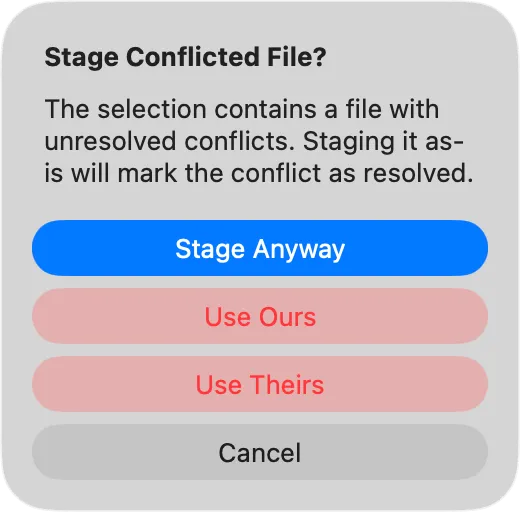
Choose how Gitfox should handle the conflicted files:
Stage Anywaystages their current contents as-is and marks them resolved. Use this after you have removed all conflict markers and reviewed the result.Use Oursreplaces each conflicted file with Git’soursversion and stages it.Use Theirsreplaces each conflicted file with Git’stheirsversion and stages it.Cancelleaves the selection unchanged.
Stage Anyway does not remove conflict markers. Any markers left in the file become ordinary staged text.
Continue after resolving conflicts
After every conflicted file is resolved and staged, click Continue in the repository status bar. Gitfox completes the interrupted merge or pull, or applies the current rebase or cherry-pick step and moves to the next one. If a later step has more conflicts, resolve and stage those files in the same way before continuing again.
You can also click Abort in the status bar to stop the operation and return the repository to its previous state.